Generative Design Pattern Series - Episode 2
Introduction
In this series of posts, we examine how established design patterns from the classical Gang of Four (GoF) patterns [1] combine to produce something greater than the sum of their parts. Where the classic Gang of Four (GoF) literature treats each pattern in isolation, real-world software architects regularly compose patterns into higher-order structures. Here these compositions are referred to as Generative Design Patterns (GDP), configurations where one pattern’s output becomes another pattern’s input, and the combination exhibits emergent structural properties neither pattern alone provides.
In Episode 1, the Strategy pattern (behavioural) composed with the Façade pattern (structural) was discussed. The vehicle for exploration was the Tic-Tac-Toe game implemented in C++ with Qt6. Today’s episode was meant to extend this same architecture into an Entity-Component-System (ECS) integration, where the ECS world itself becomes the strategy context. However, in today’s article, it is important to have a better understanding of ECS, because it forms a central theme for the series moving forwards. The second thing to observe is that in today’s episode the programming language of focus is Rust. In particular, the Bevy game engine. Although the Bevy game engine is the theme for a future wider series, in today’s article however, we present and overview the basics of the Bevy engine. This is because the Bevy philosophy and mechanism is fully committed to the ECS game engine architecture and therefore, it will be fairly straight forward to illustrate ECS pattern using the Bevy game engine to re implement the Tic-Tac-Toe game we developed in C++ in the last episode.
As with the rest of the tutorial series, this article requires the reader to have a fairly good familiarity with programming and may have written at least one trivial game or similar level of complexity in any programming language. If you have not written Rust or Bevy before, it should not matter. The topics covered are kept at a conceptually high level and only concretised using Rust and Bevy. If this episode whets your appetite for ECS and Bevy, then keep an eye on a full series on Bevy game to be released in the near future!
Where Object Orientation Struggles in Game development
Every game engine has an opinion about how to model the objects in your game world. The traditional object-oriented opinion is inheritance: a Piece base class, a Mark subclass, a PlayerMark sub-subclass that adds an input handler. Object Oriented Programming (OOP) attempts to transfer a world model into a programming model. Sometimes, this can become over engineered. Add a opponent that shares the score logic but not the input. The inheritance tree branches and can become entangled if not carefully managed, and before long reusing the code becomes harder than anticipated. The piece of code needed somewhere is locked inside a base class that is hard to safely modify [6].
The Entity-Component-System pattern, known as ECS, deconstructs the game object entirely, breaking it into three separate concepts: an identity with no data and no behaviour, data with no identity and no behaviour, and behaviour with no data and no identity. By individualising these three concepts which were in classic Object Oriented Programming, abstracted into classes, we untangle dependencies and allow for a higher level of code reuse. In future articles, we will see how we can learn from the ECS pattern to simplify C++-object-oriented implementations. ECS then wires these three decoupled concepts together at runtime using a “World” data structure. Understanding why ECS separates these concerns, and how Bevy’s World reunites them at query time, is the central subject of this episode [2].
Bevy was chosen for this episode because it commits to ECS more thoroughly than most game engine frameworks. Everything in Bevy is centred around this unifying ECS theme. Bevy provides various mechanisms that simplify through all of the phases of game development utilising this underlying ECS vehicle. In other words, In Bevy, the cognitive burden of accidental complexities within the game ecosystem, elements such as sound, rendering and so forth, is taken over and made light by using the ECS mental model. Let us go through these three concepts: Entity, Components and Systems in order. We will then circle back to discover what features Bevy provides us with.
Entities: Identity Without Data or Behaviour
In case you missed it earlier, ECS is the acronym that expands to Entity Component System. In Bevy, an Entity is an integer. Specifically, it is a 64-bit value that encodes an index into the World’s storage arrays plus a generation counter that prevents stale references [3]. That is all an Entity is. It carries no data, no methods, no components of its own. It is a key, and the World’s component storage is the table that key indexes into.
The Tic-Tac-Toe entity mapping is simple. The game has a 3 by 3 cell matrix. One can assign each cell a flat index computed as row * 3 + col, ranging from zero to eight. In Bevy, each of those nine cells becomes a separate Entity. Nothing about a cell’s position or occupant state is encoded in the Entity value itself; the index just uniquely identifies which row and column in the World’s table belongs to that cell. In Object-oriented terms, Entities are instances of components represented by scalar integer values. You obtain this unique id (reference) to an Entity when it is instantiated, also called spawning in Bevy. Then, Bevy’s query system lets you look up which components are attached to any given Entity by that reference.
Spawning a bare Entity in Bevy takes one line inside any system that receives the Commands parameter:
/* Rust -- spawning a bare entity and reading its ID */
fn spawn_bare_entity(mut commands: Commands) {
    let entity = commands.spawn_empty().id();
    println!("Spawned entity id: {:?}", entity);
}
The spawn_empty call allocates a new Entity ID in the deferred command buffer. On the next frame boundary, Bevy flushes that buffer and the Entity appears in the World. In practice you will almost never spawn a bare Entity; you will spawn an Entity with a bundle of components attached, which the project section below fully demonstrates.
Components: Data Without Identity or Behaviour
A Component in Bevy forms the OOP class with hierarchy and no methods. It is a pure Rust struct or enum that derives the Component trait. In Rust, derive is a compile-time annotation that tells the compiler to generate an implementation of a named trait for your type automatically [4]. The Component derive generates the plumbing Bevy needs to store instances of your type in the World’s component arrays and to include your type in query results. One can think of Bevy components as having 2 types - “is-a” Component, declares the type of the Entity and “has-a” Component declares shared attributes of the Entity.
The Occupant “is-a” Component
The core game state lives in the Occupant enum. It contains no methods; it is a pure data record.
/* Occupant component */
use bevy::prelude::*;

#[derive(Component, Clone, Copy, PartialEq, Default, Debug)]
pub enum Occupant {
    #[default]
    Empty,
    X,
    O,
}
Notice that Occupant contains no methods. A Component in ECS is a pure data record. The behaviour that reads and writes the occupant state lives in Systems, which the next section introduces. The additional Rust derives (Clone, Copy, PartialEq) are needed so that system code can copy and compare occupant values without borrow-checker friction.
The GridCell “has-a” Component
Because Bevy queries can carry multiple component types, a second component records each cell’s linear index in the 0 to 8 grid. This is the Bevy equivalent of indexing into.
/* Rust -- GridCell component carrying the flat cell index for each entity */
#[derive(Component)]
pub struct GridCell(pub usize);
Architectural Decision: By separating Occupant and GridCell, we allow different systems to query only what they need. A system checking for a “Draw” only needs Occupant, while a spatial system might only need GridCell.
Accidental: Marker Components
In software, anything that is not at the heart of what you are trying to achieve are accidentals (full term is accidental complexity). Two zero-sized marker components are used to “tag” entities:
BoardRoot: Attached to the parent UI node.GameOverOverlay: Attached to the end-game text. Although these are core to the game logic, they could almost be mistaken as accidentals. These markers allow systems to filter queries (e.g.,Query<Entity, With<BoardRoot>>) to find specific entities for despawning without iterating over the entire world.
Systems: Behaviour Without Data
A System in Bevy is a Rust function whose parameter list declares what data it needs. Bevy’s scheduler inspects those parameters at startup, determines which parts of the World each system reads or writes, and uses that information to decide which systems can run in parallel [2]. You register systems onto the App builder, and Bevy calls them on each frame or according to a schedule you specify. These Bevy free form functions, not attached to objects receive their data through system parameters method injection in Bevy World reference.
Note that there are two types of Systems. If you are coming from the world of enterprise programming think - CQRS (Command Query Response Segregation). In a nutshell, separate systems that mutate (change) the data - commands from those that do not - queries. Bevy does NOT exactly perform command query segregation but the concept persists. Moreover, they provide a system of method injection available to your program. In other words Bevy is able to provide component-entity and relationship data to your systems through the Commands and Queries injected as parameters to your systems, through a dependency container.
GridCell holds one value: the cell’s linear index. A Query<(&GridCell, &Occupant)> gives any system access to both the position and the occupant of every cell in one pass. A single Entity can have many Components attached simultaneously. Each of the nine grid cells will carry GridCell, Occupant, and a ButtonBundle (for visual rendering), all stored by Bevy in separate contiguous arrays [5]. That layout is what makes ECS queries fast: reading all nine Occupant values is a single pass over a tight array with no pointer chasing, because the values are never stored inside heterogeneous objects.
check_game_over()
fn check_game_over(
    cells: Query<(&GridCell, &Occupant)>,
    mut status: ResMut<GameStatus>,
    mut next_state: ResMut<NextState<GameState>>,
) {
    const WIN_STATES: [[usize; 3]; 8] = [
        [0,1,2], [3,4,5], [6,7,8],
        [0,3,6], [1,4,7], [2,5,8],
        [0,4,8], [2,4,6],
    ];

    if *status != GameStatus::InProgress { return; }

    let mut board = [Occupant::Empty; 9];
    for (cell, occ) in &cells { board[cell.0] = *occ; }

    for line in &WIN_STATES {
        let a = board[line[0]];
        if a != Occupant::Empty && a == board[line[1]] && a == board[line[2]] {
            *status = if a == Occupant::X { GameStatus::XWins } else { GameStatus::OWins };
            next_state.set(GameState::GameOver);
            return;
        }
    }

    if board.iter().all(|o| *o != Occupant::Empty) {
        *status = GameStatus::Draw;
        next_state.set(GameState::GameOver);
    }
}
The system assembles a local board array from query results, then applies the same triple-equality check the C++ code uses. The only structural difference is that the C++ functions return bool; the Bevy system writes its conclusion into the GameStatus resource and triggers a state transition through NextState.
A system is registered onto the App in main:
/* Rust -- registering check_game_over to run every frame while in the Playing state */
app.add_system(check_game_over.in_set(OnUpdate(GameState::Playing)));
The .in_set(OnUpdate(GameState::Playing)) call scopes this system to run only when the game is in the Playing state. The States section below explains how state-based scheduling works.
Understanding Bevy
Now that we understand ECS, what does Bevy actually do for game development? Bevy allows us to define components, as we saw above. We can create instances of those components as entities and keep track of the entities by their references. These can then be injected as Commands and Queries. Bevy provides us with a number of its own ECS utilities, bundled together as plugins. Similarly these are available to our programs as injected parameters. For instance access to our window resources are injected through Bevy’s default plugins. Note that a collection of plugins are known as a bundle. Bevy’s default bundle of plugins are available to our program when we use Bevy’s prelude.
use bevy::prelude::*;The renderer, the asset server, the audio system, and the UI layout engine are all implemented as plugins that register components and systems into the same World your game code uses. There is no hidden global state and no special object hierarchy that the engine uses internally but withholds from you [3]. What you learn about ECS here applies everywhere in the engine, including the parts you did not write. All code in this episode targets Bevy 0.10.
Queries: Asking the World for Data
As observed from the previous section, the Query parameter type is the primary way systems access component data. Its type parameter is a tuple of component references, and Bevy resolves that tuple against the World’s storage at call time [3]. The following signatures illustrate the query forms used across the Tic-Tac-Toe systems:
/* Rust -- four query signatures from the TTT project */

// Read both cell index and occupant from every grid cell
fn read_board(q: Query<(&GridCell, &Occupant)>) { }

// Mutably update occupant when the player clicks a cell
fn mark_cell(q: Query<(&GridCell, &mut Occupant)>) { }

// Read occupant and child text entities on cells that carry GridCell
fn render_cells(q: Query<(&Occupant, &Children), With<GridCell>>) { }

// Detect button interaction changes on grid cells only
fn handle_input(
    q: Query<
        (&GridCell, &mut Occupant, &Interaction),
        (Changed<Interaction>, With<Button>),
    >
) { }
The With<GridCell> filter in the third query means “only entities that also carry a GridCell component.” This distinguishes cell entities from other UI entities that also carry Children. The Changed<Interaction> filter in the fourth query fires only for entities whose Interaction component changed this frame, so the click handler does not iterate the entire board on every frame: it wakes only when the user actually interacts [3].
Two systems can run in parallel if their queries do not conflict. Bevy’s scheduler classifies a query as a shared reader if it contains only &T references and as an exclusive writer if it contains any &mut T. render_cells reads Occupant and can run alongside check_game_over, which also reads Occupant. handle_input writes Occupant and must be sequenced with respect to both. You do not need to manage this locking yourself; the scheduler derives the conflict graph from the query signatures at startup and makes parallel execution decisions automatically [2].
The Spawner: spawn_board
This system initializes the game. It uses Commands to spawn the UI hierarchy. Note the use of with_children to build the 3x3 grid.
The Processor: handle_click
This system handles user input. It requests a Query with a Changed<Interaction> filter. This ensures the system only wakes up when the user actually interacts with a button, rather than polling all 9 cells every frame.
The Validator: check_game_over
This system maps the ECS components to a local array to check win conditions. It decouples the UI from the game logic.
The Renderer: render_board
This system observes changes to Occupant and updates the Text and TextColor components. This “reactive” rendering is a hallmark of high-performance ECS.
The World: Where Everything Lives
The World is Bevy’s central data structure. It stores every Entity ID, every Component array, and every Resource. Bevy stores components using an Archetype model. An archetype is a unique combination of component types; every entity with exactly the same set of components belongs to the same archetype. Components for all entities in an archetype are stored in contiguous memory arrays [5]. This layout allows the CPU to iterate over data with maximum cache efficiency, as there is no pointer chasing.
You rarely interact with the World directly in application code. Systems receive it implicitly through their parameter list: a Query is a view into the World’s component storage, a Res<T> is a reference to a World-level resource, and Commands is a deferred mutation buffer that applies changes to the World between system runs [3]. The WIN_STATES constant that World.h declares as static constexpr on the C++ struct becomes a module-level constant in systems.rs; the data is the same, but its location reflects where the behaviour lives.
Bevy stores components using an archetype model. An archetype is a unique combination of component types; every entity that carries exactly the same set of component types belongs to the same archetype, and those components are stored in contiguous arrays within that archetype [5]. All nine cell entities share the archetype {ButtonBundle components, GridCell, Occupant}, so a query over (&GridCell, &Occupant) is a single tight pass over nine rows with no pointer chasing.
Resources: Global Singleton States
Turn State and Game Status
Data that exists exactly once (like the turn state) is modeled as a Resource.
Not all game data belongs to a specific entity. The current player’s turn and the outcome of the game are shared across multiple systems but are not attached to any particular cell entity. Bevy models this kind of data as a Resource: a type that derives Resource and of which there is exactly one instance in the World at any time [3]. In Bevy, xTurn field and the winner become Resources:
/* Rust -- two Resources replacing the xTurn and winner fields of World.h's World struct */
use bevy::prelude::*;
use crate::components::Occupant;

#[derive(Resource)]
pub struct CurrentPlayer(pub Occupant);

impl Default for CurrentPlayer {
    fn default() -> Self { Self(Occupant::X) }
}

#[derive(Resource, Default, PartialEq)]
pub enum GameStatus {
    #[default]
    InProgress,
    XWins,
    OWins,
    Draw,
}
CurrentPlayer carries an Occupant value rather than a boolean, which makes its meaning self-documenting at query sites. GameStatus replaces the winner string, using a typed enum instead of a stringly-typed value. The defining question for whether data should be a Resource rather than a Component is: “does the concept of having two separate instances of this type in the same World make sense?” A second simultaneous current-player state makes no sense for one game of Tic-Tac-Toe. Both types are Resources [2].
Architectural Decision: Using a Resource for CurrentPlayer ensures that our systems can easily share the turn state without needing to query for a specific entity.
Systems access resources through Res<T> for read-only access and ResMut<T> for mutable access. The handle_click system demonstrates this pattern and is the direct Bevy equivalent of Systems::getNextState from World.h:
/* Rust -- handle_click: direct port of getNextState from World.h */
fn handle_click(
    mut cells: Query<
        (&GridCell, &mut Occupant, &Interaction),
        (Changed<Interaction>, With<Button>),
    >,
    mut current_player: ResMut<CurrentPlayer>,
) {
    for (_, mut occupant, interaction) in &mut cells {
        if *interaction == Interaction::Clicked && *occupant == Occupant::Empty {
            *occupant = current_player.0;
            current_player.0 = if current_player.0 == Occupant::X {
                Occupant::O
            } else {
                Occupant::X
            };
        }
    }
}
The guard w.cells[idx] != Occupant::Empty checks that handle_click does not also check for win conditions; that responsibility belongs to check_game_over, which runs as a separate system in the same frame. ECS distributes concerns across systems rather than accumulating them in one function.
States and Schedules: Controlling When Systems Run
A game is not a single uniform loop. The active game and the end-of-game screen each need different systems running at different times. Bevy models this with States: a type-safe enum that the engine uses to filter which systems execute on a given frame [2].
The Tic-Tac-Toe project uses two states:
/* Rust -- GameState enum defining the two phases of the TTT game */
#[derive(States, Debug, Clone, Eq, PartialEq, Hash, Default)]
pub enum GameState {
    #[default]
    Playing,
    GameOver,
}
The #[derive(States)] annotation makes this enum a Bevy state type, and #[default] on Playing tells Bevy which variant to start in. Once you register this enum with app.add_state::<GameState>(), you can scope any system to a specific phase. OnEnter(GameState::Playing) runs systems once when the state transitions to Playing, which is the right place for the board spawn system that populates the World with nine cell entities. OnUpdate(GameState::Playing) runs systems every frame while in Playing, covering input handling, win detection, and rendering. OnEnter(GameState::GameOver) runs the overlay system once when the game ends.
You transition between states by injecting ResMut<NextState<GameState>> as a system parameter and calling next_state.set(GameState::GameOver). Bevy flushes the transition at the end of the frame, triggering the entry systems for the new state. The check_game_over system uses this mechanism to move from Playing to GameOver once a win or draw is detected.
The App Builder: Composing the World
The App struct is the entry point to Bevy. Before calling run(), you use it as a builder to declare everything the engine needs to know: which plugins to load, which resources to initialise, which systems to schedule, and which state machines to create [2]. Think of it as the single place in the program where all the moving parts are wired together. In a well-structured Bevy project, main.rs contains almost nothing except the App builder chain and the main function.
The Tic-Tac-Toe App builder registers six systems across four schedule slots:
/* Rust -- main.rs App builder for the TTT game */
fn main() {
    App::new()
        .add_plugins(DefaultPlugins.set(WindowPlugin {
            primary_window: Some(Window {
                title: "Tic-Tac-Toe".into(),
                resolution: (480.0, 520.0).into(),
                ..default()
            }),
            ..default()
        }))
        .add_state::<GameState>()
        .init_resource::<CurrentPlayer>()
        .init_resource::<GameStatus>()
        .add_startup_system(setup_camera)
        .add_system(spawn_board.in_schedule(OnEnter(GameState::Playing)))
        .add_system(handle_click.in_set(OnUpdate(GameState::Playing)))
        .add_system(check_game_over.in_set(OnUpdate(GameState::Playing)))
        .add_system(render_board.in_set(OnUpdate(GameState::Playing)))
        .add_system(show_game_over.in_schedule(OnEnter(GameState::GameOver)))
        .add_system(restart_on_r.in_set(OnUpdate(GameState::GameOver)))
        .run();
}
init_resource::<T>() uses Default::default() as the initial value, which is why both CurrentPlayer and GameStatus derive Default. The DefaultPlugins line loads Bevy’s built-in window management, renderer, input, asset server, and UI layout systems as a single unit [3]. Each .add_system(...) call appends a system to the relevant schedule. The .run() call creates the World, populates it with everything registered above, and starts the frame loop.
Complete Project
The following four files make up the complete Tic-Tac-Toe project. Create a workspace with cargo new tictactoe_ecs and replace the generated files. The project expects the Bevy asset root to contain assets/fonts/FiraSans-Bold.ttf; download FiraSans from Google Fonts or substitute any TTF font by updating the path string in spawn_board and show_game_over.
Cargo.toml
# TTT ECS project dependencies
[package]
name = "tictactoe_ecs"
version = "0.1.0"
edition = "2021"

[dependencies]
bevy = "0.10"
src/components.rs
/* Rust -- all ECS component types for the TTT game */
use bevy::prelude::*;

#[derive(Component, Clone, Copy, PartialEq, Default, Debug)]
pub enum Occupant {
    #[default]
    Empty,
    X,
    O,
}

#[derive(Component)]
pub struct GridCell(pub usize);

#[derive(Component)]
pub struct BoardRoot;

#[derive(Component)]
pub struct GameOverOverlay;
Occupant is the only component that carries game-logic data, mirroring World.h exactly. GridCell carries the flat index (0 to 8) so systems can map an entity to its grid position without a separate lookup structure. BoardRoot and GameOverOverlay are marker components: zero-sized types used as query filters to identify which entities to despawn when the game restarts [7].
src/resources.rs
/* Rust -- Resources replacing xTurn and winner from World.h's World struct */
use bevy::prelude::*;
use crate::components::Occupant;

#[derive(Resource)]
pub struct CurrentPlayer(pub Occupant);

impl Default for CurrentPlayer {
    fn default() -> Self { Self(Occupant::X) }
}

#[derive(Resource, Default, PartialEq)]
pub enum GameStatus {
    #[default]
    InProgress,
    XWins,
    OWins,
    Draw,
}
src/systems.rs
/* Rust -- all TTT systems; mirrors the Systems namespace from World.h */
use bevy::prelude::*;
use crate::{
    components::{Occupant, GridCell, BoardRoot, GameOverOverlay},
    resources::{CurrentPlayer, GameStatus},
    GameState,
};

const WIN_STATES: [[usize; 3]; 8] = [
    [0,1,2], [3,4,5], [6,7,8],
    [0,3,6], [1,4,7], [2,5,8],
    [0,4,8], [2,4,6],
];

pub fn spawn_board(
    mut commands: Commands,
    asset_server: Res<AssetServer>,
    existing: Query<Entity, With<BoardRoot>>,
    mut status: ResMut<GameStatus>,
    mut current_player: ResMut<CurrentPlayer>,
) {
    for e in &existing { commands.entity(e).despawn_recursive(); }
    *status = GameStatus::InProgress;
    *current_player = CurrentPlayer(Occupant::X);

    let font = asset_server.load("fonts/FiraSans-Bold.ttf");

    commands
        .spawn((
            NodeBundle {
                style: Style {
                    size: Size::new(Val::Percent(100.0), Val::Percent(100.0)),
                    justify_content: JustifyContent::Center,
                    align_items: AlignItems::Center,
                    flex_direction: FlexDirection::Column,
                    ..default()
                },
                ..default()
            },
            BoardRoot,
        ))
        .with_children(|root| {
            for row in 0..3usize {
                root.spawn(NodeBundle {
                    style: Style {
                        flex_direction: FlexDirection::Row,
                        ..default()
                    },
                    ..default()
                })
                .with_children(|row_node| {
                    for col in 0..3usize {
                        let idx = row * 3 + col;
                        row_node
                            .spawn((
                                ButtonBundle {
                                    style: Style {
                                        size: Size::new(Val::Px(130.0), Val::Px(130.0)),
                                        justify_content: JustifyContent::Center,
                                        align_items: AlignItems::Center,
                                        margin: UiRect::all(Val::Px(5.0)),
                                        ..default()
                                    },
                                    background_color: Color::rgb(0.18, 0.18, 0.18).into(),
                                    ..default()
                                },
                                GridCell(idx),
                                Occupant::Empty,
                            ))
                            .with_children(|btn| {
                                btn.spawn(TextBundle::from_section(
                                    " ",
                                    TextStyle {
                                        font: font.clone(),
                                        font_size: 80.0,
                                        color: Color::WHITE,
                                    },
                                ));
                            });
                    }
                });
            }
        });
}

pub fn handle_click(
    mut cells: Query<
        (&GridCell, &mut Occupant, &Interaction),
        (Changed<Interaction>, With<Button>),
    >,
    mut current_player: ResMut<CurrentPlayer>,
) {
    for (_, mut occupant, interaction) in &mut cells {
        if *interaction == Interaction::Clicked && *occupant == Occupant::Empty {
            *occupant = current_player.0;
            current_player.0 = if current_player.0 == Occupant::X {
                Occupant::O
            } else {
                Occupant::X
            };
        }
    }
}

pub fn check_game_over(
    cells: Query<(&GridCell, &Occupant)>,
    mut status: ResMut<GameStatus>,
    mut next_state: ResMut<NextState<GameState>>,
) {
    if *status != GameStatus::InProgress { return; }

    let mut board = [Occupant::Empty; 9];
    for (cell, occ) in &cells { board[cell.0] = *occ; }

    for line in &WIN_STATES {
        let a = board[line[0]];
        if a != Occupant::Empty && a == board[line[1]] && a == board[line[2]] {
            *status = if a == Occupant::X { GameStatus::XWins } else { GameStatus::OWins };
            next_state.set(GameState::GameOver);
            return;
        }
    }

    if board.iter().all(|o| *o != Occupant::Empty) {
        *status = GameStatus::Draw;
        next_state.set(GameState::GameOver);
    }
}

pub fn render_board(
    cells: Query<(&Occupant, &Children), With<GridCell>>,
    mut texts: Query<&mut Text>,
) {
    for (occupant, children) in &cells {
        for child in children {
            if let Ok(mut text) = texts.get_mut(*child) {
                text.sections[0].value = match occupant {
                    Occupant::X     => "X".to_string(),
                    Occupant::O     => "O".to_string(),
                    Occupant::Empty => " ".to_string(),
                };
                text.sections[0].style.color = match occupant {
                    Occupant::X     => Color::CYAN,
                    Occupant::O     => Color::YELLOW,
                    Occupant::Empty => Color::WHITE,
                };
            }
        }
    }
}

pub fn show_game_over(
    mut commands: Commands,
    asset_server: Res<AssetServer>,
    status: Res<GameStatus>,
) {
    let message = match *status {
        GameStatus::XWins => "X wins!",
        GameStatus::OWins => "O wins!",
        GameStatus::Draw  => "It's a draw!",
        _                 => "",
    };

    commands.spawn((
        TextBundle::from_section(
            format!("{}\nPress R to restart", message),
            TextStyle {
                font: asset_server.load("fonts/FiraSans-Bold.ttf"),
                font_size: 48.0,
                color: Color::WHITE,
            },
        )
        .with_style(Style {
            position_type: PositionType::Absolute,
            position: UiRect {
                top: Val::Px(16.0),
                ..default()
            },
            align_self: AlignSelf::Center,
            ..default()
        }),
        GameOverOverlay,
    ));
}

pub fn restart_on_r(
    keys: Res<Input<KeyCode>>,
    mut next_state: ResMut<NextState<GameState>>,
    overlays: Query<Entity, With<GameOverOverlay>>,
    mut commands: Commands,
) {
    if keys.just_pressed(KeyCode::R) {
        for entity in &overlays {
            commands.entity(entity).despawn_recursive();
        }
        next_state.set(GameState::Playing);
    }
}
WIN_STATES is declared at module level in systems.rs, the direct Rust equivalent of static constexpr std::array<std::array<int,3>,8> WIN_STATES on the C++ World struct. Every system in this file corresponds to a function in the Systems namespace of World.h. The mapping is one-to-one: handle_click is getNextState, check_game_over combines isWinState and isBoardFilled, spawn_board is resetGame generalised to include the visual layer, and restart_on_r re-invokes the Playing entry sequence through the state machine.
src/main.rs
/* Rust -- complete main.rs wiring all TTT systems onto the App */
mod components;
mod resources;
mod systems;

use bevy::prelude::*;
use resources::{CurrentPlayer, GameStatus};
use systems::*;

#[derive(States, Debug, Clone, Eq, PartialEq, Hash, Default)]
pub enum GameState {
    #[default]
    Playing,
    GameOver,
}

fn main() {
    App::new()
        .add_plugins(DefaultPlugins.set(WindowPlugin {
            primary_window: Some(Window {
                title: "Tic-Tac-Toe".into(),
                resolution: (480.0, 520.0).into(),
                ..default()
            }),
            ..default()
        }))
        .add_state::<GameState>()
        .init_resource::<CurrentPlayer>()
        .init_resource::<GameStatus>()
        .add_startup_system(setup_camera)
        .add_system(spawn_board.in_schedule(OnEnter(GameState::Playing)))
        .add_system(handle_click.in_set(OnUpdate(GameState::Playing)))
        .add_system(check_game_over.in_set(OnUpdate(GameState::Playing)))
        .add_system(render_board.in_set(OnUpdate(GameState::Playing)))
        .add_system(show_game_over.in_schedule(OnEnter(GameState::GameOver)))
        .add_system(restart_on_r.in_set(OnUpdate(GameState::GameOver)))
        .run();
}

fn setup_camera(mut commands: Commands) {
    commands.spawn(Camera2dBundle::default());
}
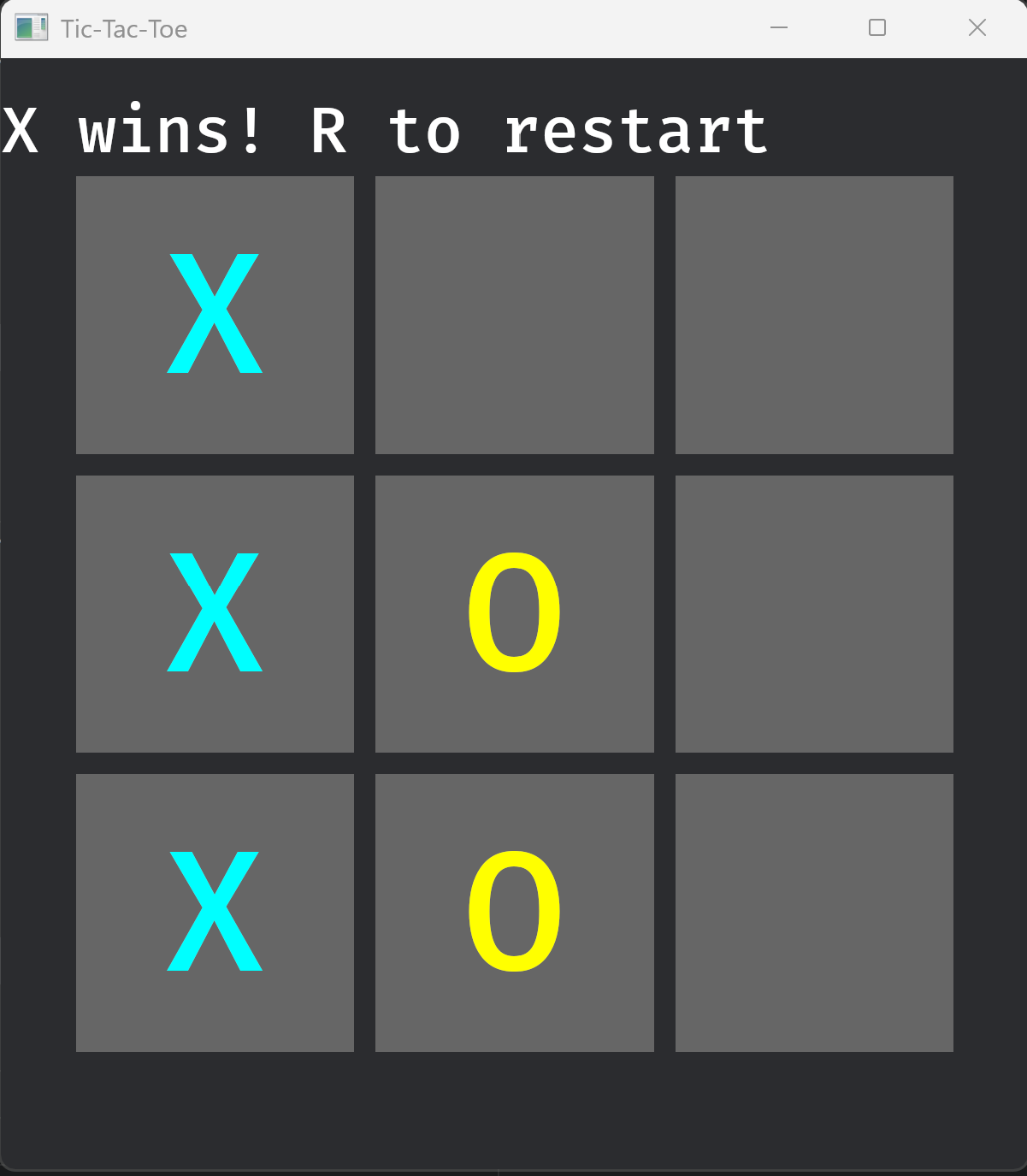
Running cargo run opens a 480 by 520 window displaying a 3x3 grid of dark square buttons. Clicking any empty cell marks it with the current player’s symbol, cyan for X and yellow for O. Once three cells in a line share the same symbol, the game transitions to GameOver, an overlay displays the result, and pressing R despawns the overlay and re-enters Playing, which triggers spawn_board to reset the board fresh.
Bevy’s World serves to distribute the data across typed arrays rather than. Systems are free functions with no coupling baggage to each other. The World becomes the shared data store that allows them to compose. In Episode 3, this is the context into which the Strategy pattern will re-enter: the ECS World becomes the strategy context, and swapping game rules means replacing the Occupant logic in the systems while the World structure remains untouched.
References
[1] Gamma, E., Helm, R., Johnson, R., Vlissides, J. (1994). Design Patterns: Elements of Reusable Object-Oriented Software. Addison-Wesley. Original GoF definitions of Strategy (p. 315) and Façade (p. 185). Cited for the GDP composition framing in the Introduction.
[2] Bevy Foundation. The Bevy Book. Available at bevyengine.org/learn/quick-start/introduction. Cited for the ECS model, World architecture, App builder pattern, Plugin system, States and schedule sets, and parallel scheduling behaviour.
[3] Bevy Contributors. Bevy API Documentation 0.10.0. Available at docs.rs/bevy/0.10.0/bevy. Cited for the Entity integer representation, Query parameter types, Res and ResMut semantics, Commands deferred buffer, archetype storage model, ButtonBundle, and Interaction component.
[4] Klabnik, S., and Nichols, C. The Rust Programming Language, 2nd ed. No Starch Press, 2023. Available at doc.rust-lang.org/book. Cited for the derive macro mechanism and trait implementation syntax as applied to the Component, Resource, and States derives.
[5] skypjack. “ECS back and forth, Part 1.” Personal blog, 2019. Available at skypjack.github.io/2019-02-14-ecs-baf-part-1. Cited for the design rationale of separating identity, data, and behaviour in ECS and the archetype storage model underlying Bevy’s component arrays.
[6] Nystrom, R. Game Programming Patterns. Genever Benning, 2014. Available at gameprogrammingpatterns.com/component.html. Cited for the Component design pattern and the problems with deep inheritance hierarchies in game objects.
[7] Bevy Contributors. Bevy Examples Repository, v0.10.0. Available at github.com/bevyengine/bevy/tree/v0.10.0/examples. Cited for the marker component pattern as idiomatic Bevy practice and UI hierarchy spawning patterns.
Glossary
App: Bevy’s application builder struct; the composition root onto which plugins, systems, resources, and state machines are registered before run() creates the World and starts the frame loop.
Archetype: A unique combination of component types in Bevy’s World; every entity that carries exactly the same set of component types belongs to the same archetype, and those entities’ components are stored in contiguous arrays. Adding or removing a component moves an entity between archetypes.
BoardRoot: A zero-sized marker component attached to the root UI node of the 3x3 grid; used as a query filter in spawn_board to find and despawn the previous board on restart. See also: GameOverOverlay.
Commands: A deferred mutation buffer available as a system parameter; changes issued through Commands such as spawning entities, inserting components, and despawning are applied to the World between system runs rather than immediately.
Component: A plain Rust struct or enum that derives Component; carries per-entity data with no methods or behaviour, stored by Bevy in contiguous arrays indexed by entity and archetype.
ECS (Entity-Component-System): An architectural pattern that separates a game object’s identity (Entity), data (Component), and behaviour (System), connecting them at query time through a World; the pattern on which Bevy is built throughout.
Entity: A 64-bit integer that uniquely identifies a game object in the World; carries no data or behaviour of its own, serving only as a key into the World’s component storage arrays.
GameOverOverlay: A zero-sized marker component attached to the end-of-game text entity; used as a query filter in restart_on_r to find and despawn the overlay before re-entering Playing. See also: BoardRoot.
GameState: The user-defined States enum in the TTT project modelling the two game phases (Playing, GameOver); used to scope systems to specific phases via OnEnter and OnUpdate schedule sets.
GDP (Generative Design Pattern): A composition of two or more standard design patterns where the structural requirements of one pattern naturally produce or reinforce the structure required by the other, yielding properties neither provides alone.
GoF (Gang of Four): Refers to the four authors, Gamma, Helm, Johnson, and Vlissides, of Design Patterns: Elements of Reusable Object-Oriented Software (1994), the foundational catalogue of 23 object-oriented design patterns.
GridCell: A component carrying the flat linear index (0 to 8) of a Tic-Tac-Toe cell entity; the Bevy equivalent of the indexOf(row, col) helper in World.h.
Occupant: The sole game-logic component in the TTT project; an enum with three variants (Empty, X, O) that records which player, if any, has claimed a given cell. Direct port of enum class Occupant from World.h.
OnEnter / OnUpdate / OnExit: Bevy schedule sets that scope system execution to state transitions; OnEnter runs once when entering a named state, OnUpdate runs every frame while in that state, and OnExit runs once when leaving it.
Query: A Bevy system parameter type whose type parameter declares which component types the system needs access to; Bevy resolves the query against the World’s component storage at call time and provides an iterator over matching entities.
Res / ResMut: Bevy system parameter types for accessing Resources; Res<T> provides shared read-only access and ResMut<T> provides exclusive mutable access, with parallel scheduling enforced automatically by Bevy’s scheduler.
Resource: A Rust struct that derives Resource; represents World-level singleton data not attached to any entity, accessed through Res<T> or ResMut<T> system parameters. See also: Component.
System: A plain Rust function registered on the App builder whose parameters declare the component and resource data it needs; Bevy calls systems on each frame and uses their parameter signatures to schedule them in parallel where possible.
World: Bevy’s central runtime data structure that owns all Entities, Component arrays, Resources, and the system Schedule; created by App::run() and accessed by application code indirectly through Query, Res, and Commands parameters.